
Installing Shindig on Mac OS X
by Eiji Kitamura
Reference: Shindig - an Apache incubator project for OpenSocial and gadgets
Maven Needs to Be Installed First #
Download it from Maven - Download Maven 2.0.8. There's no specific installation process required; just put it somewhere appropriate and set up your path. For now:
> ~/Development/apache-maven-2.0.8Let's put it here. Also, set up the environment variables:
> export JAVA_HOME='/System/Library/Frameworks/JavaVM.framework/Versions/A' > export PATH=$PATH:/Users/ekita/Development/apache-maven-2.0.8/bin...or so I thought, but Maven was already installed! What the heck, OS X!!
Setting Up Shindig #
> mkdir ShindigCheck out the Shindig source code from the repository:
> svn co http://svn.apache.org/repos/asf/incubator/shindig/trunk .Build it:
> cd ~/Development/Shindig/java/gadgets> mvn packageIt looks like it automatically downloads various dependencies and takes care of things for you.
Trying to Run Shindig #
> mvn jetty:run-warApparently it's supposed to run with this, but...
[INFO] Scanning for projects...
[INFO] Searching repository for plugin with prefix: 'jetty'.
[INFO] org.apache.maven.plugins: checking for updates from central
[INFO] org.codehaus.mojo: checking for updates from central
[INFO] artifact org.apache.maven.plugins:maven-jetty-plugin: checking for updates from central
[INFO] ------------------------------------------------------------------------
[ERROR] BUILD ERROR
[INFO] ------------------------------------------------------------------------
[INFO] The plugin 'org.apache.maven.plugins:maven-jetty-plugin' does not exist or no valid version could be found
[INFO] ------------------------------------------------------------------------
[INFO] For more information, run Maven with the -e switch
[INFO] ------------------------------------------------------------------------
[INFO] Total time: 2 seconds
[INFO] Finished at: Wed Mar 12 16:18:09 JST 2008
[INFO] Final Memory: 1M/2M
[INFO] ------------------------------------------------------------------------
It doesn't work... Apparently, something called Jetty is required.
Running Jetty #
I know next to nothing about Java servers, but for now I downloaded jetty-6.1.8 and moved it under ~/Development.
> cd ~/Development/jetty-6.1.8
> java -jar start.jar
I gave that a shot. Apparently, this gets the Jetty web server running (Apache probably needs to be running too). Next, I created a symlink to the Shindig war file built earlier:
> ln -s ~/Development/Shindig/java/gadgets/target/gadgets.war ~/Development/jetty-6.1.8/webapps/gadgets.warAnd when accessing it...
http://localhost:8080/gadgets/files/samplecontainer/samplecontainer.html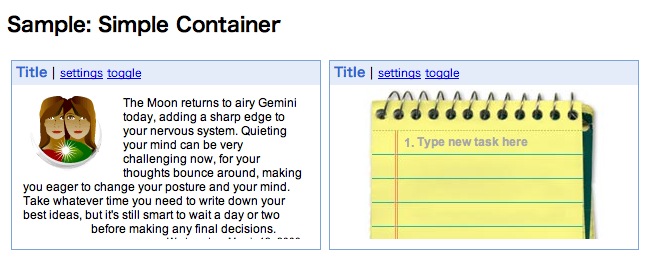
It worked!! That's all for today.