
I made a FriendFeed widget for Dashboard
by Eiji Kitamura
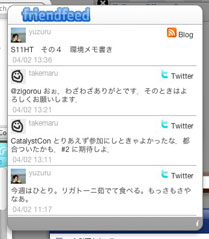
I've created and released FriendFeeder (tentative name), a Mac OS X Dashboard widget for FriendFeed, which has been getting a lot of buzz lately. It probably still has plenty of bugs, but since it's working for now, I decided to just put it out there.
What is FriendFeed? #
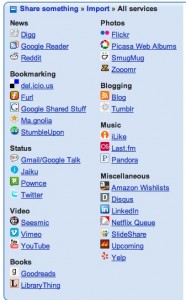
FriendFeed is a web service that's been gaining a lot of traction recently on places like TechCrunch. Many are calling it the next Twitter. In a nutshell, it's an SNS aggregator—perhaps best described as an SNS that brings together numerous other social networks.
When I say SNS, it's not a standalone social network like Facebook. Instead, it specializes in aggregating the latest updates from SNS-like services such as regular blogs, Twitter, Flickr, YouTube, del.icio.us, and Last.fm. It also features commenting on entries and star-like favoriting functions.
Why is FriendFeed so exciting? #
To put it simply, this service is clearly conscious of Twitter's existence and positions itself as an extension of it.
Twitter has now become a resident desktop app/service for many people (I personally use a Dashboard widget called TwitterBoard). What's fascinating is how Twitter's plain, minimalist interface has spawned a rich variety of apps built by many developers. With FriendFeed's simple interface and robust API, it's hard not to think it took cues from Twitter and is aiming for something even greater.
Another point that feels very Twitter-conscious is its commenting feature. FriendFeed reorganizes replies on Twitter to display the flow of conversation clearly. It also offers an option to post comments made on FriendFeed directly as Twitter updates.
In that sense, rather than just an SNS aggregator, it might be more accurate to call it "Twitter + α." At least for me personally, that's likely how I'll be using it most.
Not just another feed aggregator #
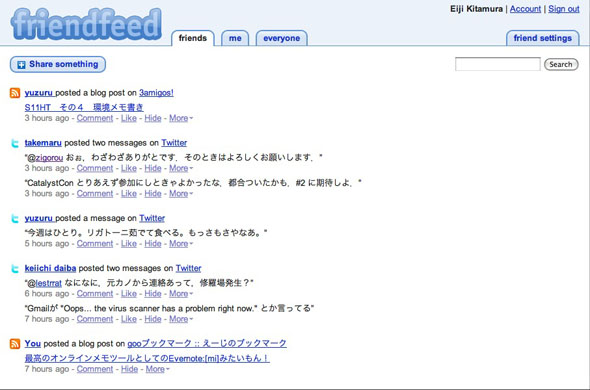
Until now, feed aggregators basically meant RSS readers, but FriendFeed is far from just a typical feed aggregator. That's because it handles authentication and authorization.
Normally, RSS feeds are publicly available, so there's no need to worry much about privacy. Since many people are expected to view the exact same content, using caching allows for significant efficiency. However, the external services FriendFeed handles include those requiring authentication, such as Gmail. This means it requires one feed fetch per user.
This seems like an enormous task compared to Twitter. The more users it gets, the harder it will become to scale. I wonder what kind of architecture powers it under the hood?
The future of FriendFeed #
An Adobe AIR desktop application is scheduled to be released. In addition, while you can currently only connect predefined services, they are reportedly preparing a mechanism that allows service providers to build their own APIs for FriendFeed.
Except for having a variety of user interfaces (via its API) and the ability to connect easily (via Follow), it's no coincidence that this closely resembles Facebook's direction. Aggregating the social graph is the obvious trajectory, but it will be interesting to see which path attracts the most users.
Downloading and using FriendFeeder #
Now, on to the main topic (laughs).
Download here
Requires Mac OS X 10.4.3 or later (presumably).
Known issues #
No scrollbar appears! Please use your mouse wheel.
How to use #
First, create an account on FriendFeed.
On the back of the widget (the settings screen), enter your ID and Remote Key (not your password). You can find your Remote Key at http://friendfeed.com/remotekey.
Feedback #
I'm considering adding commenting and Twitter-posting features in the future. If you have any other feedback, please leave a comment on this post or let me know on Twitter.
Also, my FriendFeed account is at http://friendfeed.com/agektmr, so follows are more than welcome.