
Trying out OAuth authentication with the MySpace RESTful API
by Eiji Kitamura
The MDP (MySpace Developer Platform) available on MySpace includes not only OpenSocial but also its own proprietary RESTful APIs, making it possible to build server-side applications as well. In this post, I'll focus on OAuth authentication for MDP's RESTful APIs.
About OAuth in OpenSocial/MDP #
OAuth is an authorization protocol that allows a container such as OpenSocial (hereafter referred to as the consumer)—which mediates between a user and a service the user wants to use (hereafter referred to as the service provider)—to manipulate APIs without knowing the service provider's authentication credentials.
For example, when a user tries to use a service provider's app on a consumer, the expected flow is: the user is redirected to an authentication screen on the service provider's domain, the user grants permission, and only then does the consumer become authorized to use the service provider's API.
However, the OAuth currently specified in OpenSocial is not the full specification. Flows such as redirecting the user to the service provider's authentication screen or exchanging tokens between the consumer and the service provider are not anticipated.
This is likely due to reasons such as OpenSocial gadgets running in JavaScript and thus being unable to manage tokens. The same condition seems to apply to MySpace's own RESTful APIs: as long as you have a consumer key and consumer secret, you can perform OAuth authentication without a token.
- For detailed specifications on OAuth, please refer to this resource.
Creating an Application Profile #
First, let's prepare to build an application on MySpace.
To build an application on MySpace, you need a user account and an application profile account. The following site explains the process with screenshots, so please refer to it:
MySpace アプリケーションを作ろう – ラーニング人生。
Preparing for OAuth Authentication #
Once your application profile is created, no XML or JavaScript code is required for now. Since our goal this time is to test the RESTful API authentication, click My Apps on the left side of the screen and click "Edit Details" for the application profile you created.
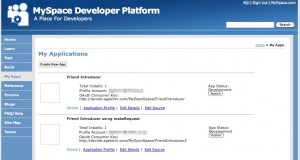
Near the bottom of the screen, you'll find the OAuth Consumer Key and OAuth Consumer Secret sections. You will need these to access the RESTful API, so copy and paste them into a text editor or notepad. You can change the OAuth Consumer Key to whatever you like, so you may want to change it (don't forget to save).

Testing Authentication with the OAuth Tool #
OAuth authenticates by creating a Signature from the consumer key, nonce, timestamp, and other parameters. Generating signatures can be complex, so this time we'll use the OAuth Tool provided by MDP to test it out.
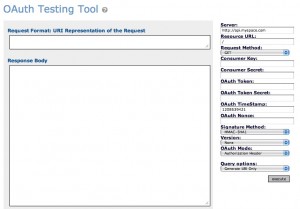
Fill in the fields on the right side of the screen:
- Server: The server URL. In RFC3986 terms, this corresponds to the
schemeandauthority. Here, set it tohttp://api.myspace.com. - ResourceURL: The path following the server URL. In RFC3986 terms, this corresponds to the path.
It does not include query or fragment. Set this to
/users/{user_id}/friends, replacing{user_id}with your own user ID. Other available endpoints are listed here. - Request Method: The HTTP method. Set it to GET.
- Consumer Key: The OAuth consumer key. Enter the Consumer Key you noted earlier.
- Consumer Secret: The OAuth consumer secret. Enter the Consumer Secret you noted earlier.
- OAuth Token: The token. In standard OAuth, authorization is only granted after receiving user permission and exchanging it for an access token. Leave this blank for now.
- OAuth Token Secret: The token secret. Required for token exchange in standard OAuth. Leave this blank for now.
- OAuth TimeStamp: TimeStamp. Enter the current time as a UNIX timestamp. Leave this blank for now.
- OAuth Nonce: Nonce. Any value is fine, but a different value must be sent every time. Leave this blank for now.
- Signature Method: Signature method. Select HMAC-SHA1.
- Version: OAuth version. Set it to 1.0.
- OAuth Mode: OAuth mode. Set it to Authorization Header.
- Query options: How to use the OAuth Tool. Set it to Generate URI and Submit.

That's it. Click "execute."
What did you get in the Response Body? If your friends list is returned, it was successful. If you append .json to the end of the Resource URL, you can also receive the result in JSON format.
Summary #
In fact, this OAuth approach is used not only when making requests from an external server to the container (MySpace), but also for requests sent to external servers via the container's proxy using OpenSocial's makeRequest. In that case, of course, the endpoint on your own server must support OAuth.
What bothers me is that the token exchange and the authentication on the service provider side are omitted. I had thought OpenSocial and OAuth would be a great match, but if authentication cannot be performed, it means you cannot link a User ID held by a service provider with a User ID on the container. Am I simply misunderstanding the specification, or will proper OAuth support be added in the future?
I will explain data exchange with external servers using makeRequest on another occasion.
- The API (or OAuth Tool?) seems somewhat unstable; it worked fine around noon, but while writing this post, it returned a Not Found error for some reason...