
Building an OpenSocial Application (2)
by Eiji Kitamura
In Building an OpenSocial Application (1), I covered how gadgets work and how to get an account on Orkut. This time, I will explain the code for the application introduced last time. This application (FriendIntroducer) is a simple app, common on platforms like mixi, where you can write an introduction for your friends when viewing it yourself, and other people can read the introductions written about them when they view it. From a JavaScript or jQuery perspective, there are certainly smarter ways to implement this, but since the focus here is on OpenSocial code, please bear with any crude code.
Gadget XML #
<?xml version="1.0" encoding="UTF-8" ?>
<module>
<moduleprefs title="Friend Introducer" title_url="" description="Introduce your friend!" height="100">
  <require feature="opensocial-0.7" />
  <require feature="views" />
  <require feature="dynamic-height" />
 </moduleprefs>
<content type="html" view="canvas">
  < ![CDATA[
  <link href="http://devlab.agektmr.com/OpenSocial/css/FriendIntroducer.css" rel="stylesheet" type="text/css">
  <script type="text/javascript" src="http://devlab.agektmr.com/OpenSocial/js/jquery.js"></script>
  <script type="text/javascript" src="http://devlab.agektmr.com/OpenSocial/js/FriendIntroducer.js">< /script>
  </script><script type="text/javascript">
    gadgets.util.registerOnLoadHandler(FriendIntroducer.init);
  </script>
  <div id="title"></div>
  <div id="friends"></div>
  <div id="message"></div>
  ]]>
 </content>
</module>
Here, we are doing the following:
- Configuring gadget settings
- Loading external CSS and JavaScript
- Calling the initialization script
- Defining
divelements for display
<content type="html" view="profile">Content is specified with html type and profile view. For type, both html and url can be selected, but here it is set to html, and the body is written inside the Content tag. As for view, the OpenSocial specification assumes profile and canvas, but some containers also seem to have home or preview. In this example, canvas is used.
Also, if no view is specified, it is treated as the default view. Containers switch views depending on the display context, but you can also retrieve the view within the Content and branch your logic using JavaScript.
Content Body #
The content inside Content can basically be handled just like a regular web page and written in HTML, but:
<script type="text/javascript">
  gadgets.util.registerOnLoadHandler(FriendIntroducer.init);
</script>
You can include initialization logic using gadgets.util.registerOnLoadHandler like this.
In this application, three empty div tags are prepared as a display template.
JavaScript Code #
The JavaScript source code is available here, but let's take a look at some excerpts.
$('#friends').html('Requesting friends...');
var req = opensocial.newDataRequest();
req.add(req.newFetchPersonRequest('VIEWER'), 'viewer');
req.add(req.newFetchPeopleRequest('VIEWER_FRIENDS'), 'friends');
req.add(req.newFetchPersonAppDataRequest('VIEWER', 'Introduction'), 'intro');
req.send(FriendIntroducer.onLoadViewerFriends);
This is the most fundamental operation: retrieving the viewer, the viewer's friends, and saved data.
We create a data request object with opensocial.newDataRequest(), append three types of requests with add, and finally send the data request with send by specifying a callback function. Each of the three requests is given a name (key)—viewer, friends, and intro—so they can be distinguished later.
var viewer  = response.get('viewer').getData();
var friends = response.get('friends').getData();
var intro   = response.get('intro').getData();
Inside the callback function, you can retrieve the requested data via the response argument using response.get(key).getData().
var viewer_id = viewer.getId();
var json = null;
if (intro[viewer_id]) {
  if (intro[viewer_id].Introduction) {
    var json_str = gadgets.util.unescapeString(intro[viewer_id].Introduction);
    var json = eval(json_str)[0];
  }
}
intro is the content previously stored in the container's data storage area using this application—in other words, "previously saved friend introductions."
$('#title').html('<p>Friends of '+viewer.getDisplayName()+':</p>');
var html = '';
if (friends.size() == 0) {
  $('#message').html("<p>You don't have any friends yet!</p>");
}
A message is displayed in case the user does not have any friends yet.
friends.each(function(person) {
  var t = FriendIntroducer.template.friend_list_canvas;
  t = t.replace('##thumbnail_url##', person.getField(opensocial.Person.Field.THUMBNAIL_URL));
  t = t.replace('##profile_url##',   person.getField(opensocial.Person.Field.PROFILE_URL));
  t = t.replace('##display_name##',  person.getDisplayName());
  t = t.replace('##input_id##',      'input_'+person.getId());
  if (json) {
    t = t.replace('##intro_text##',  json[person.getId()] ? json[person.getId()] : '');
  } else {
    t = t.replace('##intro_text##', '');
  }
  html += t;
});
$('#friends').html('<ul>'+html+'</ul>');
In OpenSocial, array traversal—or iteration—is included in the specification, so you can use each. Here, we loop through the friends list and inject the friend's name, thumbnail image, and saved introduction into an HTML template.
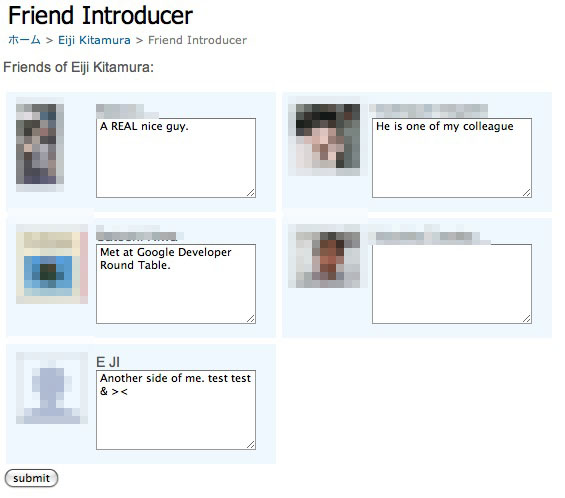
Up to this point, we have rendered the canvas page where friend introductions can be written. Next, let's assume the user has written friend introductions and look at how to submit and save them.
Saving Data #
OpenSocial provides a data storage area in the container where applications can persist data. This is called persistent data or AppData. In version 0.7, AppData only supports escaped strings (saving raw JSON seems to be planned for the next version).
var list = $('#friends ul li');
var intro = "{result:[{";
for (var i=0; i < list.length; i++) {
  var textarea = list[i].lastChild.lastChild;
  var uid = textarea.id.substring(6);
  var intro_text = textarea.value.replace("'", "\'");;
  intro += "'"+uid+"':'"+intro_text+"'";
  intro += (list.length-1)==i ? "" : ",";
};
intro += '}]};';
var req = opensocial.newDataRequest();
intro = gadgets.util.escapeString(intro);
This process is triggered when the user finishes writing friend introductions and clicks the submit button. It is standard JavaScript that traverses the DOM to retrieve each friend's user ID and introduction text. By concatenating the retrieved content into a JSON string and escaping it, it can be saved as AppData.
req.add(req.newUpdatePersonAppDataRequest('VIEWER', 'Introduction', intro));
req.send(function() {
  $('#message').html('<p>Your introduction has been submitted.');
});
Finally, add the JSON-formatted string to a data request object and send it, and the process is complete.
Summary #
This article turned out to be mostly laying out source code rather than an in-depth explanation, but hopefully it gave you a good sense that most of an OpenSocial application can be built using just JavaScript. Next time, I plan to cover makeRequest, which is used to interact with external servers.