
Trying out OAuth with Data Availability
by Eiji Kitamura
As promised in my previous post, I will write some actual server-side code to test OAuth using MySpace's Data Availability. While the name Data Availability might sound grandiose, it is actually an OpenSocial RESTful API. By the way, Data Availability currently only supports the JSON format and does not support AtomPub yet (plus it returns a 404, which tripped me up quite a bit orz). In this post, I will explain how to obtain authentication and authorization using OAuth and call the Data Availability API.
Preparation #
First, create an app in the MySpace sandbox environment. If you are unsure of the specific steps, please refer to this guide.
In MySpace, gadget apps and external apps seem to be handled in the same way.

Opening Edit Details lets you edit the application's detailed settings.
Recall what is required to use OAuth. First are the consumer key (consumer_key) and consumer secret (consumer_secret).
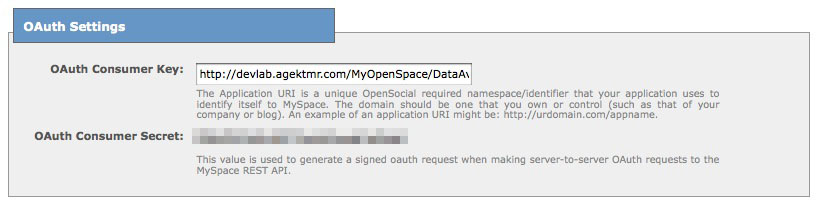
With MySpace, these two are issued as soon as you register an application. You can change the consumer key to whatever you like, but here I made it look like the URL of an application gadget XML. You will need it later, so copy and paste it somewhere.
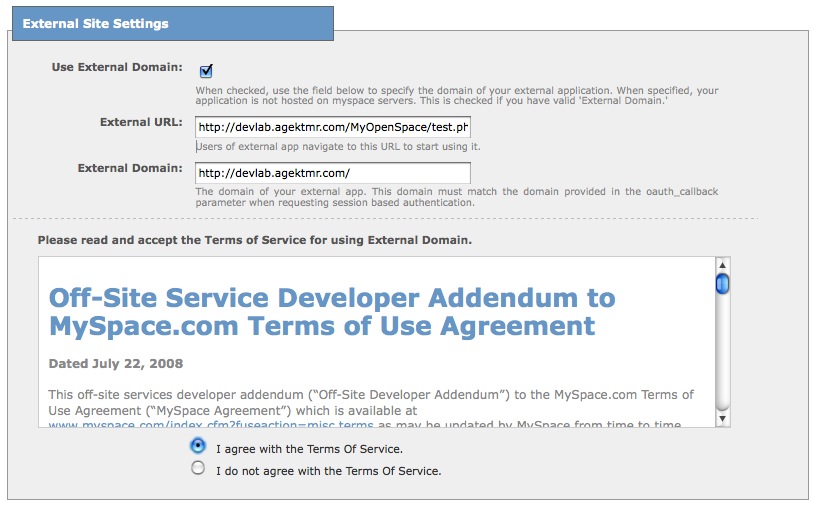
Next, towards the bottom of the same page, there is a section called External Site Settings. This is the core of Data Availability.
- Check "Use External Domain"
- Enter the redirection target URL from MySpace in "External URL"
- Enter the domain of the server where the external app is actually hosted in "External Domain"
- Read and agree to the Terms of Service
Now the preparation is complete.
Implementing OAuth #
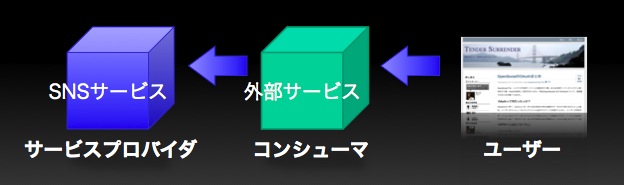
What we will test here is the external service in the diagram above—that is, the consumer. MySpace acts as the service provider. While you could implement it from scratch, there is a convenient library available, so we will use its PHP version. We will also use HMAC-SHA1 as the signature method.
The OAuth flow is as follows. I recommend reading this article to understand the specification.
- Obtain a request token
- User authentication
- Obtain an access token
- Access resources
Obtaining a Request Token #
Include the necessary libraries.
require_once 'oauth/OAuth.php';
require_once 'oauth/OAuth_TestServer.php';
Let's set up the variables. We'll use the consumer_key and consumer_secret we noted earlier here. The endpoint for obtaining the request token is documented in MySpace's documentation.
$consumer['key'] = 'http://devlab.agektmr.com/MyOpenSpace/DataAvailabilityExample';
$consumer['secret'] = '************';
$endpoint = 'http://api.myspace.com/request_token';
Writing the signature logic is tedious, so we will leave it to the library.

```php
$server = new TestOAuthServer(new MockOAuthDataStore());
$server->add_signature_method(new OAuthSignatureMethod_HMAC_SHA1());

$sig_methods = $server->get_signature_methods();
$sig_method = $sig_methods['HMAC-SHA1'];

$consumer = new OAuthConsumer($consumer['key'], $consumer['secret'], NULL);
$request = OAuthRequest::from_consumer_and_token($consumer, NULL, "GET", $endpoint, null);
$request->sign_request($sig_method, $consumer, NULL);

$req = curl_init($request);
curl_setopt($req, CURLOPT_RETURNTRANSFER, 1);
$result = curl_exec($req);
With this code, the request token will be returned in $result. It is returned in the same format as a URL query string, so parse it as needed.
parse_str($result, $tmp);Now you should have obtained the oauth_token and oauth_token_secret.
Authentication #
Next, have the user authenticate. This is done at the endpoint http://api.myspace.com/authorize. At this time, attach the previously obtained oauth_token and oauth_callback as parameters. oauth_callback is the URL of the page called after authentication.
$callback_url = 'http://devlab.agektmr.com/MyOpenSpace/access.php';
$auth_url = 'http://api.myspace.com/authorize?oauth_token='.urlencode($tokens['oauth_token']).
    '&oauth_callback='.urlencode($callback_url);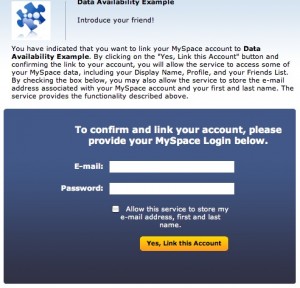
Obtaining an Access Token #
The user will be redirected to the oauth_callback URL specified earlier with oauth_token appended as a parameter. This indicates that this oauth_token has been authorized, allowing it to be exchanged for an access token.
$consumer = new OAuthConsumer($consumer['key'], $consumer['secret'], NULL);
$tokener  = new OAuthConsumer($tokens['oauth_token'], $tokens['oauth_token_secret']);
$access = OAuthRequest::from_consumer_and_token($consumer, $tokener, "GET", $endpoint, null);
$access->sign_request($sig_method, $consumer, $tokener);

$req = curl_init($access);
curl_setopt($req, CURLOPT_RETURNTRANSFER, 1);
$result = curl_exec($req);
The code is not much different from when obtaining the request token. Once the access token's oauth_token and oauth_token_secret are returned, you are all set.
Calling the RESTful API #
By sending an OAuth request signed with the consumer_key, consumer_secret, oauth_token, and oauth_token_secret obtained so far to the RESTful API, you can retrieve data such as friend lists.
$consumer = new OAuthConsumer($consumer['key'], $consumer['secret'], NULL);
$tokener  = new OAuthConsumer($tokens['oauth_token'], $tokens['oauth_token_secret']);
$resource = OAuthRequest::from_consumer_and_token($consumer, $tokener, "GET", $endpoint, array('format'=>'JSON'));
$resource->sign_request($sig_method, $consumer, $tokener);

$req = curl_init($resource);
curl_setopt($req, CURLOPT_RETURNTRANSFER, 1);
$result = curl_exec($req);
Now you just set the endpoint ($endpoint) to the URL of the resource you want to retrieve. The data will be returned in JSON format in the response body.
Sample Application #
I have prepared a sample where you can check the behavior while seeing the entire flow using the code above. It should serve as a helpful reference for what kind of requests to send.