
OpenSocial OAuth Summary
by Eiji Kitamura
In OpenSocial, when a container communicates with an external server, or when an external server communicates with a container, OAuth is used for authorization. In this post, I will summarize the current state of OAuth in OpenSocial.
Note (2008/10/20): Please also make sure to read this post written on 2008/10/4.
What Was OAuth Again? #
OAuth is a mechanism that allows a Consumer to access a User's Resources hosted on a Service Provider without the user having to hand over their credentials (username and password) to the consumer. For example, imagine a scenario where a User wants to use their Google (Service Provider) address book (Resource) on MySpace (Consumer). Without OAuth, you would have to entrust your Google ID and password to MySpace. With OAuth, the user directly interacts with Google for authentication, allowing address book data to be passed to MySpace without ever revealing their Google ID/password to MySpace.
Two Flavors of OAuth #
As useful as OAuth is, there are two variants used in OpenSocial.
OAuth Core #
In OAuth Core, as explained earlier, the interaction takes place between three parties: the User, the Consumer, and the Service Provider. Since this is the foundational flow, please refer to resources like this for more details.
OAuth Consumer Request #
On the other hand, OAuth Consumer Request strips out the user authentication part of the OAuth specification and focuses purely on communication between the Consumer and the Service Provider; it is commonly referred to as "two-legged OAuth." Because this specification relies entirely on the trust relationship between the consumer and the service provider without involving user authentication, it was presumed to be used when a consumer wants to retrieve public information from a service provider. (This was an embarrassing mistake on my part. To be accurate, it is a specification where the consumer adds a signature so the service provider can verify the identity of the requester and the integrity of the request content. / Added in October 2009) By the way, in OpenSocial v0.7, OAuth Core is not included in the spec, and this two-legged OAuth is used instead. OAuth Core support is introduced in OpenSocial v0.8 and later (naturally, two-legged OAuth remains available as well).
OAuth Usage Patterns in OpenSocial #
There are two primary patterns for using OAuth in OpenSocial.
Outbound OAuth: Gadgets Communicating with External Servers #
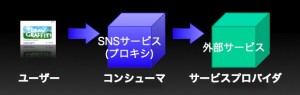 For our purposes, let's call this Outbound OAuth. This is the case where a gadget built with
 type="html" acts as the consumer—proxied through the SNS container—and communicates with an external server acting as the service provider via makeRequest.
Inbound OAuth: External Servers Communicating with the Container #
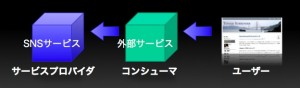 Let's call this Inbound OAuth. In this case, an external server acting as the consumer hits the RESTful API of the SNS container, which acts as the service provider. A
 type="url" gadget calling the SNS container's RESTful API via an external server also falls under this category.
Prerequisites for Using OAuth #
There are several prerequisites for using OAuth. Setting aside the finer details of the spec, here is what is required upfront:
- The Consumer must know the following, issued in advance by the Service Provider:
- Consumer Key (
consumer_key) - Consumer Secret (
consumer_secret)
- Consumer Key (
- The Consumer must know the following three URLs used for the OAuth exchange with the Service Provider:
- The Service Provider's Request Token URL
- The Service Provider's Access Token URL
- The Service Provider's Authorization URL
Note (2008/10/20): When the signature method is RSA-SHA1, the consumer secret is not required. See here for details. Let's examine how these prerequisites are met for each OAuth usage pattern.
The Case for Outbound OAuth #
Since this is the case where a gadget communicates with an external server, the gadget developer first registers the consumer key and consumer secret with the SNS container. However, as far as I know, no SNS has implemented Outbound OAuth yet. Therefore, let's assume for now that the consumer key and consumer secret have been passed to the container through some means (such as submitting via a form on an SSL page). (Methods to achieve this are expected to appear over time.) Next, the various Service Provider URLs need to be provided; v0.8 specifies doing this within the gadget XML. Create an oauth element inside ModulePrefs:
<oauth>
  <service name="google">
    <request url="https://www.google.com/accounts/OAuthGetRequestToken?scope=http://www.google.com/m8/feeds/" />
    <access url="https://www.google.com/accounts/OAuthGetAccessToken" />
    <authorization url="https://www.google.com/accounts/OAuthAuthorizeToken" />
  </service>
</oauth>
Since OAuth isn't necessarily limited to communicating with a single server, you can support multiple servers by adding multiple Service entries. You can differentiate them using Service@name, so add the following parameter to opt_params in makeRequest as needed to specify the service:
gadgets.io.RequestParameters.OAUTH_SERVICE_NAME
As for discovering the URLs for the OAuth exchange with the service provider, XRDS-Simple is another possible approach, but I will cover that in detail on another occasion.
The Case for Inbound OAuth #
This is when an external application accesses the SNS container's RESTful API. This corresponds directly to initiatives like Facebook's Facebook Connect, MySpace's Data Availability, and Google's FriendConnect, which can still be considered experimental. As for the consumer key and consumer secret, they are issued when you register your application on the SNS container. The developer simply copies/pastes them into the consumer server's code. For discovering the URLs, you can either refer directly to the documentation/help pages or use auto-discovery via XRDS-Simple.
Summary #
This post covered the broad concepts, but next time I plan to walk through an actual implementation: performing OAuth authentication using MySpace Data Availability and fetching data.