
OpenSocial (Shindig) Server Architecture
by Eiji
When it comes to getting involved with OpenSocial, there are a few options:
- Becoming a container
- Developing gadgets
- Building client services using REST
Whichever path you choose, understanding the underlying architecture is extremely important. In particular, when developing gadgets, there are many situations where having a grasp of the architecture makes development significantly smoother.
In this article, I would like to explain the architecture of Shindig, an open-source reference implementation used by almost all OpenSocial-compliant containers.
The Relationship Between Gadgets and SNS #
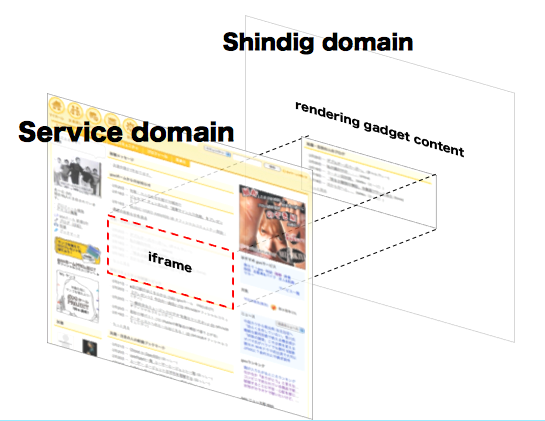
Did you know how iGoogle (which already uses Shindig) displays gadgets created by third parties? In fact, gadgets rendered on a separate domain (gmodules.com in the case of iGoogle) are displayed inside an iframe.
The reason for this is that placing JavaScript written by third parties on the same domain poses a serious security risk. For more details, please check out my previous article explaining Caja.
Where the APIs Reside #
OpenSocial provides four social APIs: People, Group, Activity, and Persistent. Each of these supports RESTful formats (JSON, XML, and AtomPub) as well as an RPC-based JSON format. Shindig's JavaScript API uses the RPC-based JSON format among these.
As I explained earlier regarding the two domains, since this is a JavaScript API—meaning Ajax—the endpoints must naturally reside on the same domain, which is Shindig's domain.
The Flow of Rendering a Gadget #
Now that we understand the basic structure, let's take a look at the actual flow up to the point where a gadget is displayed.
Deciding Which Gadget to Display #
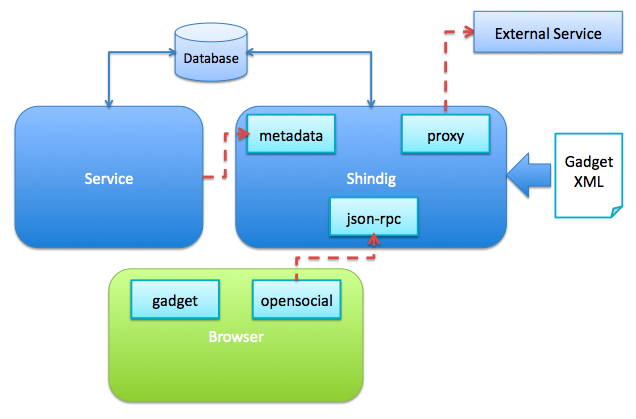
To display a gadget, the user must first indicate their intent to display it. In iGoogle, for example, this is done on the service side by having the user pick a gadget they like from the gadget directory and loading their personal page. Once the service knows which gadget to display, it needs to gather information about the gadget in order to render the iframe for it. This is done using Shindig's metadata API.
Fetching Metadata #
Upon receiving a request to the metadata API, Shindig checks its cache. If the gadget's information is not cached, Shindig fetches the gadget XML based on the request from the service and parses it.
Rendering the iframe #
Having obtained the necessary information about the gadget, the service renders an iframe to display it. This triggers a request from the browser to Shindig to render the gadget inside the iframe.
Basically, the contents specified in the gadget XML are displayed as-is, but it's worth keeping the following points in mind:
- JavaScript for the specified gadget features (sets of functionalities provided to gadgets, such as tabs or minimessages) is appended to the HTML.
- Depending on the configuration, all external content such as JavaScript, CSS, and images may be cached on Shindig and served from there.
With that, the gadget display process is complete. If you inspect the APIs using tools like Firebug, you will see that requests are being sent to Shindig.
APIs That Interact with External Servers #
When interacting with external servers, the gadgets.io.makeRequest JavaScript API is used. If you select FEED as the content type, it returns RSS, RDF, or Atom data in a unified format; if you choose JSON, the response is immediately ready to be handled as a JSON object as soon as the data arrives.
Several options are also available in terms of security:
- Standard requests
- Signed Requests
- OAuth
A standard request is used for APIs that do not require any particular authentication. A Signed Request refers to an OAuth Consumer Request, which allows an external server to ensure that requests originate only from the gadget. OAuth refers to OAuth Core, which allows the external server to not only verify that a request comes from the gadget, but also authenticate who made the request using secure credentials.
For more details on OAuth, please refer to this article or this one.
One important thing to note is that all of this goes through Shindig's proxy. As mentioned earlier, strong caching is applied to GET requests here as well, so you may need to exercise some caution. I plan to cover caching in detail in a future article.