
Google Chrome Extension "Social Graph Analyzer" Released
by Eiji
Since Extensions became available on the Dev channel for Mac, I've recently started using Google Chrome. I think it's a very promising browser that combines extensibility not found in Safari with lightness and speed that surpasses Firefox. It's so pleasant to use that it's already becoming my primary browser. Google has done it again.
Now, speaking of Google Chrome, developing extensions seemed straightforward, so I gave it a shot and built one. That is the Social Graph Analyzer.
How to Use #
Once installed, a person icon will appear in the top-right corner of the screen. To use it, simply click it whenever you are on a profile page of someone you're interested in. It doesn't matter which service's profile page it is. When clicked, a speech bubble pop-up appears, displaying other services that the person uses. Of course, the service URLs are links, so clicking them will open those pages.
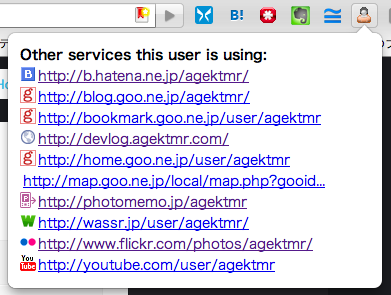
Those who know will already understand, so I won't go into how it works under the hood, but if the information is published and connected via microformats or FOAF, there's a good chance it will show up.
Looking Ahead #
In the future, I think it would be nice to display a badge with the count of linked services just by viewing the page, or allow navigating through friends.
It's particularly handy when used on Twitter pages. Please give it a try!
Download here: Social Graph Analyzer