
Trying WebSocket binary messages gave me a glimpse into the future of the web.
by Eiji Kitamura
This is a long post, so I'll put the conclusion right up front: the binary messaging feature in WebSocket will fundamentally overturn the way the internet has worked until now. Some of you might be thinking, "Yeah, I already know that." I thought I understood it in theory too, but after actually building an application with it, I truly felt it firsthand. It's a bit of a long read, but let me explain what I mean.
What is WebSocket? #
WebSocket is one of the most closely watched technologies surrounding HTML5. With regular HTTP communication, the server cannot respond without a request from the client, but WebSocket enables bidirectional communication between client and server. By taking advantage of this, it will become possible to build a wide variety of highly real-time services moving forward.
That said, WebSocket has walked a tumultuous path. While it had been available in various browsers for a few years, it underwent major specification overhauls due to security concerns and other issues. Late last year, it finally reached a solid milestone, and the complex specification has mostly settled down. Currently, Google Chrome supports the full specification, and it is said that Firefox 11 and Internet Explorer 10 will soon support it as well.
Among all the features of WebSocket, what I'm paying the closest attention to is binary transmission. Previously, you could only exchange text, but the latest specification allows sending binary messages as well. While it was previously possible to send binary data as text using encodings like Base64, sending raw binary directly eliminates roughly 30% of that overhead. Of course, that's not the only value of binary messaging, as you'll see once you read through to the end of this article.
Audio Stream Experiment #
Here, let me introduce a demo using WebSocket binary messaging that I built recently. With this demo, users can stream audio files from their local machine in real time. From here on, I'll be talking about how the app was built, so if you're only interested in how WebSocket will change the web, feel free to skip ahead to "What WebSocket Binary Messaging Really Means."
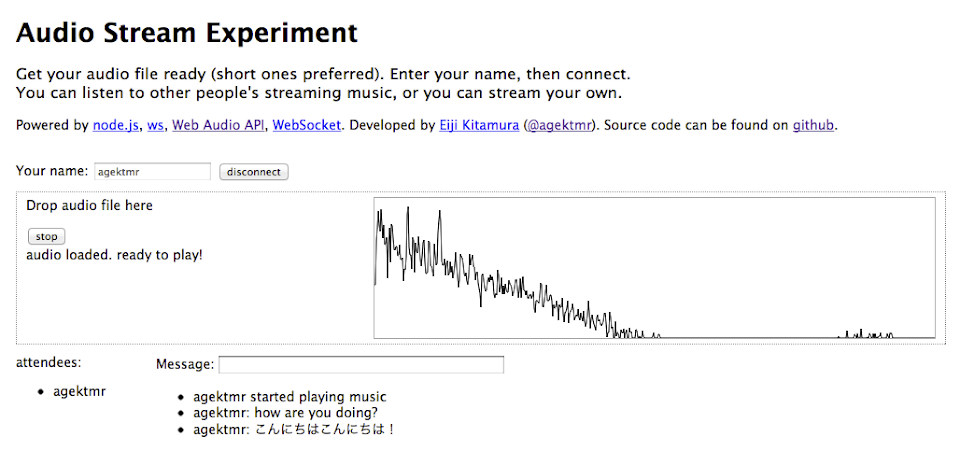
If you're interested in the technology behind this app, by all means, go ahead and give it a try (Chrome required). The source code is also available on GitHub.
Enter any name, click connect, drag and drop an audio file such as MP3, WAV, or M4A from your desktop, and click the play button to start streaming the audio. If there's no one else in the Attendee list, you can open two browser windows yourself and visit the site in both to test how the audio is streamed across them.
Architecture #
The audio playback mechanism used here is the Web Audio API. It's a specification led primarily by engineers at Google; currently it's only available in Chrome, but eventually it should be usable in other WebKit-based browsers like Safari as well. Standardization discussions are ongoing, but as of March 2012, I haven't heard of implementations outside of WebKit. Firefox has a similar API called the Audio Data API, but there seem to be no plans to standardize that one. I'll skip a detailed explanation of the Web Audio API here, but I have slides from a past HTML5 study group if you'd like to check them out.
The server uses node.js. Characterized by non-blocking, asynchronous I/O, node.js is currently one of the most talked-about server technologies, and it can be written entirely in JavaScript. As of March 2012, there aren't many WebSocket libraries in any language that handle binary, but among the options for node.js, I chose a library called ws.
For the node.js server, I used node-ninja, provided by Firstserver (which uses SmartMachines virtual servers developed by Joyent, essentially the home base of node.js).
In this demo, the server built with node.js broadcasts the received audio data, providing a synchronized audio streaming environment to all connected users.

Each client has two audio playback mechanisms, called Player and Listener. An audio file dragged and dropped from the desktop is played back locally via the Player, while simultaneously being transmitted to the node.js server over WebSocket. The server immediately broadcasts the received audio data to all clients. Each client feeds the audio data received from the server into its Listener and plays back the sound.
By the way, in addition to audio streaming, the demo also includes a simple chat feature.
WebSocket Basics #
First, let's look at basic WebSocket usage.
Exchanging Text Messages #
The WebSocket API available in the browser is very simple.
First, open a socket:
var ws = new WebSocket('ws://localhost:3000');When the server accepts the connection, an open event fires:
ws.onopen = function() {
  ...
}
To send a message:
ws.send(message);To receive a message, listen for the message event:
ws.onmessage = function(msg) {
  ...
}
Similarly, when the connection closes, a close event fires:
ws.onclose = function(event) {
  ...
}
As you can see, the WebSocket API itself is remarkably simple.
The challenge that arises from this simplicity is the importance of the protocol that runs on top of it. The WebSocket API includes a specification for Subprotocols, but despite requiring standardization and server implementation, as of March 2012 only SOAP is registered with IANA, and virtually no servers implement it, so it's not practically usable. In other words, if you want to send multiple types of commands over WebSocket, you have to define the rules yourself.
For example, in this demo, I handle the following message types:
- A
connectmessage to start a session - A
connectionmessage to notify of other users' presence - A
messagemessage to send and receive text messages - A
heartbeatmessage to keep the connection alive - A
start_musicmessage to let others know who started playing music
With this many message types, you also need to attach accompanying metadata such as "who sent it," "what kind of message it is," and "who is currently connected." Needless to say, sending structured messages like JSON becomes essential.
Exchanging Binary Messages #
When transmitting audio data, binary messages are used. I initially underestimated it, but sending and receiving binary messages is far less straightforward than text. Message structuring in WebSocket is necessary not just for text, but for binary as well. In fact, WebSocket does not allow mixing text and binary in a single message. Binary must be sent as binary, and text as text, separately. In other words, if you want to attach metadata to a binary message, you have to get creative.
When building this demo, the metadata I actually needed to attach to the binary message included:
- The user ID of who played the audio
- The number of audio channels
- The audio buffer length
- The actual audio buffers × number of channels
All of this information has to be delivered to other clients. Given the constraints of WebSocket's simple API, there are only three obvious approaches to achieve this:
- Send a text message and a binary message as a pair
- Open separate WebSocket connections per client for text and binary
- Embed the metadata directly into the binary itself
First, the paired message approach. If you're only sending from client to server, this is feasible. By specification, the server knows who is connected, so it can receive the first text message and wait for the subsequent binary message. However, what happens when the server broadcasts them in the order received? While clients can know who else is connected, matching up pairs of messages arriving in arbitrary order on the client side without disrupting sequence is non-trivial. It's not impossible with enough effort, but it would force you to sacrifice node.js's greatest advantage: non-blocking execution.
The second approach—opening separate WebSocket connections per client for text and binary—solves the problem above. The connection itself acts as metadata identifying the user, and the message pairing can be guaranteed. However, as the number of connected users grows, resource consumption increases exponentially. Once the Multiplexing Extension becomes available, this might become a viable solution, but right now it's not a great option.
The third approach is to manipulate the binary itself and embed the metadata inside it. With this method, you can bundle the actual data and the required information into a single message. While implementing binary manipulation is tedious, it makes everything else much simpler. I went with this approach for the demo.
Handling Binary Data in JavaScript #
Manipulating binary in JavaScript was never completely impossible, but the techniques required were convoluted and took a toll on execution speed. However, with several recently introduced specifications for handling binary, it has become significantly easier. There are two main types of binary representations newly available in JavaScript: Blob and ArrayBuffer.
Blob #
A Blob is a chunk of binary data, and you can essentially think of its contents as a file. The File object inherits from Blob, so files selected via input[type="file"] or dragged and dropped can be handled the same way. By using the FileReader API, you can also convert them into an ArrayBuffer or a Data URL.
In this demo, when a file is dropped, the Blob file is converted into an ArrayBuffer using FileReader's readAsArrayBuffer method:
    updatePlayer: function(file, callback, playEndCallback) {
      var that = this;
      var reader = new FileReader();
      reader.onload = function(e) {
        ac.decodeAudioData(e.target.result, function(buffer) {
          that.audioReady = true;
          if (that.audioPlayer) that.audioPlayer.stop();
          that.visualizer.disconnect();
          that.audioPlayer = new AudioPlayer(that.audioMerger);
          if (playEndCallback) that.audioPlayer.onPlayEnd = playEndCallback;
          that.audioPlayer.load(buffer, that.websocket);
          that.visualizer.connect(that.audioMerger, ac.destination);
          callback();
        }, function() {
          throw 'failed to load audio.';
        });
      };
      reader.readAsArrayBuffer(file);
    },
ArrayBuffer #
An ArrayBuffer is also a chunk of binary data, but its key feature is that it can be manipulated as an array using TypedArrays. A TypedArray lets you slice out data from an ArrayBuffer using various "views," such as unsigned integers (Uint8Array) or floating-point numbers (Float32Array). In the Web Audio API, audio data is stored as Float32Arrays of a given buffer length per channel, so this is what we work with.
Unlike standard JavaScript arrays, an ArrayBuffer doesn't allow you to arbitrarily append or remove bytes on the fly. You must allocate the necessary memory upfront and fill in values at specific offsets. Also, packing different types of TypedArrays into a single ArrayBuffer requires a bit of know-how.
Extracting Audio Data from Web Audio API #
In the Blob sample code above, we used decodeAudioData to convert the data into a Web Audio API AudioBuffer object. An AudioBuffer object manages audio data as Float32Array binary. But sending this Float32Array all at once wouldn't be streaming—it would be no different from a regular file upload and download. How do we break this data into chunks and send it progressively?
Fortunately, the Web Audio API provides a handy component called JavaScriptAudioNode. By inserting this into the audio routing graph, an onaudioprocess event fires for each buffer length, allowing you to intercept and extract the passing audio data. We can use this here. (By the way, according to Chris Rogers, who is authoring the Web Audio API spec, JavaScriptAudioNode is deprecated and slated for removal. I haven't verified alternative approaches to meet this need yet.) (Update 2012/3/14: After confirming with Chris Rogers again, there are currently no plans to deprecate JavaScriptAudioNode.)
    this.js.onaudioprocess = function(event) {
      var buffers = [];
      for (var i = 0; i < that.audioBuffer.length; i++) {
        buffers.push(that.audioBuffer[i].shift() || new Float32Array(BUFFER_LENGTH));
      }
      if (that.type == 'Player') {
        if (that.audioBuffer[0].length == 0) {
          that.stop();
        } else {
          var msg = AudioMessage.createMessage({
            user_id:UserManager.getUserId(),
            buffer_length:BUFFER_LENGTH,
            buffer_array:buffers
          });
          that.socket.send(msg.buffer);
        }
      }
      for (var i = 0; i < buffers.length; i++) {
        event.outputBuffer.getChannelData(i).set(buffers[i]);
      }
    };
The buffer length (BUFFER_LENGTH) is set to 2048. When you simply want to play back an existing audio file, using an AudioBufferSourceNode is standard, but here I'm taking the approach of feeding buffers directly into the JavaScriptAudioNode. While doing so, it also prepares the data to be sent over WebSocket.
Manipulating Binary #
The extracted 2048-sample Float32Array spans two channels, so we combine this with metadata into a single binary payload:
      createMessage: function(msg_obj) {
        var bl = msg_obj.buffer_length;
        var ch_num = msg_obj.buffer_array.length;
        var ab = new ArrayBuffer(4 + 1 + 4 + (bl * ch_num * 4));
        var view = new DataView(ab);
        var offset = 0;
        view.setUint32(offset, msg_obj.user_id);
        offset += 4;
        view.setUint8(offset, ch_num);
        offset += 1;
        view.setUint32(offset, bl);
        offset += 4;
        for (var i = 0; i < ch_num; i++) {
          for (var j = 0; j < bl; j++) {
            view.setFloat32(offset, msg_obj.buffer_array[i][j]);
            offset += 4;
          }
        }
        return new Uint8Array(view.buffer);
      },
When you need to store multiple types within binary data, you use DataView. This allows you to take a JSON object and specify which type and value to write starting at a specific byte offset. Now that we have a binary payload packed with multiple pieces of data, we send it directly over WebSocket. Since node.js simply broadcasts what it receives, the receiving clients only need to parse it and play the sound. Check the source code for full details.
What WebSocket Binary Messaging Really Means #
If you've read this far thinking, "Whoa, that sounds tedious!", you're entirely right. But before long, libraries will solve these challenges, and once protocols mature, developers won't have to worry about the underlying mechanics. Things like JSON Schema (though not yet supporting TypedArrays) or Protocol Buffers were the first things that came to mind to address these issues.
In the node.js ecosystem, for instance, a library called Socket.IO already exists. While it doesn't support binary messages yet, they've stated support is coming in v1.0, so it's only a matter of time. With libraries like that, developers will be able to exchange data without even being conscious of the underlying protocol. And that is precisely where the future I caught a glimpse of lies.
As we pursue greater speed across the internet, WebSocket will become indispensable. It will be used even when building services that don't strictly require real-time capabilities. There are two primary reasons: WebSocket's reduced overhead and data compression.
For example, if a service with frequent communication is already using WebSocket, what is the point of using Ajax separately? Google API Expert Mr. Komatsu previously published an interesting article comparing communication speeds between WebSocket and Ajax. Looking at that alone makes you realize: if you already have an open WebSocket connection, there's little reason to go out of your way to use Ajax. Taken to its logical conclusion, I think we'll soon see architectures where the server renders the web page once, and from then on, a WebSocket connection controls all communication without using Ajax at all.
Then there's data compression. There's no question that converting to binary reduces data size compared to sending plain text. On top of that, once the upcoming WebSocket Deflate Extension arrives, data will be compressed even further.
Furthermore, as demonstrated in this post, sending binary requires embedding metadata directly into that binary. In that case, what's the point of sending text data separately at all? It's only a matter of time before libraries emerge that boast superior speed by sending everything as binary from the start. I believe there's a real possibility that all data flowing over WebSocket on the internet could eventually become binary.
Conclusion #
To put it slightly boldly, this has the potential to be a paradigm shift for the web. The possibility that the primary protocol of the web could transition from HTTP to some protocol running on top of WebSocket isn't something that can be entirely ruled out.