
Dispelling Common Misconceptions About the Payment Request API
by Eiji Kitamura
This post is for day 12/8 of the Chromium Browser Advent Calendar 2017. It is a translation of the English version I recently posted on Medium, with some additions tailored for an audience in Japan.
Ever since the Payment Request API made its debut, it has garnered an immense amount of interest. At the same time, because of its complexity, misunderstandings and hype based on inaccurate information have also cropped up. In this article, I would like to clear up common misconceptions I've observed in people's reactions and provide accurate information.
If you don't know what the Payment Request API is in the first place, I recommend starting here.
Web Payment API? Chrome Payment API? Google Payment API? #
All of those are incorrect. The correct name is the "Payment Request API." Moreover, this is not something exclusive to Google or Chrome; it was created as an open standard specification and is supported by browsers other than Chrome as well. As of November 2017, the supported browsers are:
- Chrome for Android
- Chrome for iOS
- Desktop Chrome (Mac, Windows, Linux)
- Microsoft Edge
- Samsung Internet Browser
And the following browsers are in the process of implementing it:
- Apple Safari
- Mozilla Firefox
Does using the Payment Request API mean the browser takes care of payment processing too? #
Incorrect. Even when using the Payment Request API, in order to process the payment and initiate the transfer of funds, payment information must be sent to a payment processor such as a payment gateway or payment processor.
Think of the Payment Request API as a JavaScript-based alternative to checkout forms. When a user taps the "Pay" button, instead of a form being submitted to a server via POST, JavaScript receives the user's payment information. In a typical implementation, this information is processed by sending it to a payment processor.
Does Chrome's Payment Request API use payment information tied to a Google Account? #
Yes, that is true, but that may not necessarily always be the case. Currently, there are two main types of payment methods: basic card and payment apps.

With basic card, Chrome's Payment Request UI displays a mix of two payment method sources:
- Locally stored payment information
- Payment information stored in the Google Account associated with the user's Chrome profile
By checking Chrome's autofill settings (chrome://settings/autofill), you can see the card information available for the Payment Request API and web forms.
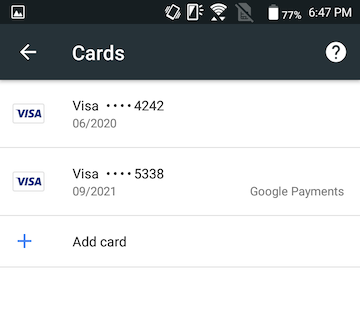
Items labeled with "Google Payments" next to them are payment details stored in your Google Account (locally stored card details are not saved to your Google Account).
The other payment method is payment apps, which can flexibly support a wide variety of payment options. This could be credit cards, e-money, cryptocurrencies, or bank transfers (unfortunately, as of November 2017, no payment apps implementing non-credit-card payment methods exist yet). Payment apps are provided separately from browsers like Chrome or vendors like Google.
The same applies to other browsers. In Microsoft Edge, the Payment Request API connects to Microsoft Wallet and accesses payment information tied to a Microsoft account. Samsung Internet Browser does something similar, utilizing payment information tied to a Samsung account exclusively on Samsung devices. Both achieve this using basic card, but they could support payment apps in the future.
Can the Payment Request API only handle credit cards? #
Incorrect. As mentioned earlier, it can support any payment method, including e-money, cryptocurrencies, and bank transfers.
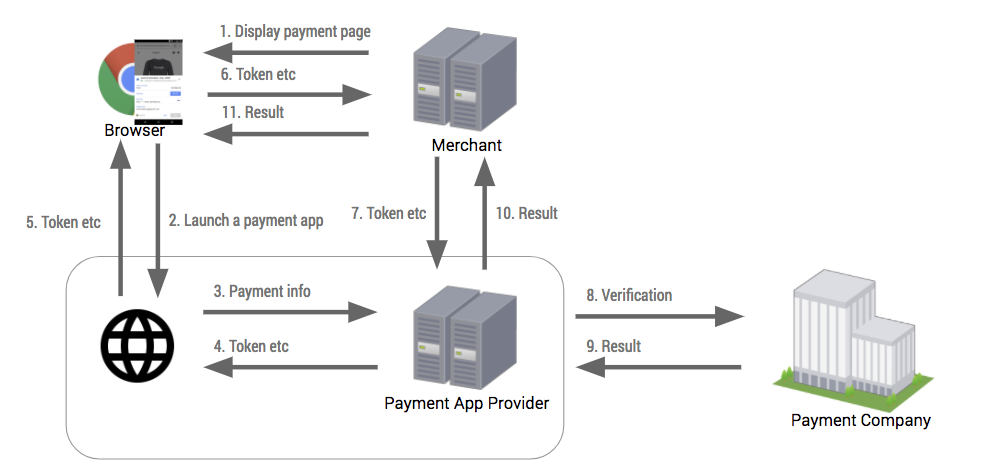
The Payment Request API acts as a bridge between the browser and payment methods. It is designed to flexibly connect payment apps built natively or on the web, technically allowing anyone to offer unique payment methods (though in practice, adoption by payment processors may become a bottleneck).
If I use the Payment Request API, I don't have to worry about PCI DSS, right? #
This is also incorrect. In countries where PCI DSS is required, the Payment Request API does not exempt you from compliance.
If your site complies with PCI DSS or PCI SAQ A-EP, you can use the Payment Request API as long as it remains secure.
If your site complies with PCI SAQ A, be cautious. PCI SAQ A does not permit handling raw credit card data. This means you must not use the Payment Request API, at least with basic card.
In Japan, addressing lags in security measures for payment systems, the Ministry of Economy, Trade and Industry (METI) has been spearheading the "Action Plan 2017 for Strengthening Security Measures in Credit Card Transactions." Under this plan, all online merchants handling credit cards must either not retain credit card details (non-retention) or achieve PCI DSS compliance by March 2018. While the definition of non-retention is somewhat akin to PCI SAQ A without being quite as strict, implementing support for the Payment Request API requires a solid understanding of what this implies.
In any case, when it comes to PCI-related questions, I recommend consulting with your payment processor.